Hong Kong IP Prices 2026: Cheapest Static Residential Proxies



Clean IP picks: Static IPs from $1.5 each, Dynamic IPs from $0.5/GB


In 2026, Hong Kong proxy IP prices depend mainly on the network type and billing model:
Datacenter IPs are typically billed per IP and rental period, making them the most affordable option;
Residential proxies are usually billed by traffic usage;
Static residential / ISP proxies are also typically billed per IP and rental period, but they cost more because a fixed exit IP is reserved for long-term use.
If you're choosing a Hong Kong IP, comparing monthly prices alone isn't enough. You should also check the network type, whether the IP is dedicated, whether it stays the same throughout the rental period, and the bandwidth and replacement policies.

Hong Kong IP Pricing in 2026
Hong Kong IP prices are mainly determined by three factors: whether the IP comes from a datacenter or a residential network, whether the exit IP remains fixed, and whether the IP is dedicated.
Why prices differ: Datacenter proxies generally use hosting or datacenter network resources, which tend to have lower costs.
Rotating residential proxies are billed by traffic, so you pay for the data you use.
Static ISP proxies reserve a fixed exit IP for a specified period, so pricing is usually based on the number of IPs and the rental term.
Actual prices also depend on bandwidth, exclusivity, IP quality, and purchase volume.
Understand the terminology: "Static" describes whether the IP address changes during the rental period. "Residential" refers to the network's residential origin. "ISP proxy" refers to an IP associated with an internet service provider. "Dedicated" means the IP is reserved for one customer.
Before purchasing, verify the network classification, residential status, exclusivity, and whether the IP is guaranteed to remain unchanged throughout the rental period.
If you need a long-term, fixed Hong Kong exit IP, explore IPDEEP's Hong Kong Static Residential IPs.
Why Choose Static Residential IPs for Long-Term Operations?
For services that require persistent logins, IP selection usually starts with one key question: will the exit IP change? Price matters, but connection consistency often matters more. Static residential IPs are commonly chosen for three reasons:
▸ Fixed exit IP: The address stays the same throughout the rental period, helping maintain a consistent network environment between sessions without repeatedly switching to new exit IPs.
▸ Dedicated access: A dedicated IP reduces interference from other customers using the same exit address, making it a better fit for workflows that require a consistent network environment.
However, IP reputation, subnet history, and account behavior can still affect how platforms assess a connection. A dedicated IP does not guarantee unrestricted access or prevent every type of restriction.
▸ Consistent network attributes: The IP's ASN, ISP association, and geolocation can remain stable over time. When used with an anti-detect browser, this can make it easier to maintain a consistent browsing environment.
Hong Kong Static Residential IP Price Comparison in 2026
The following table summarizes indicative prices based on publicly available provider information. Product definitions, regional availability, and discount structures vary, so the listed prices are not always directly comparable.
▸ Bright Data: Shared options may have a lower estimated per-IP price, but minimum purchase requirements and account approval may apply. The product specifications may also differ, so the price should not be treated as equivalent to a dedicated Hong Kong static residential IP.
▸ LoongProxy, IPdodo, and CyberYozh: These providers can serve as additional pricing benchmarks.
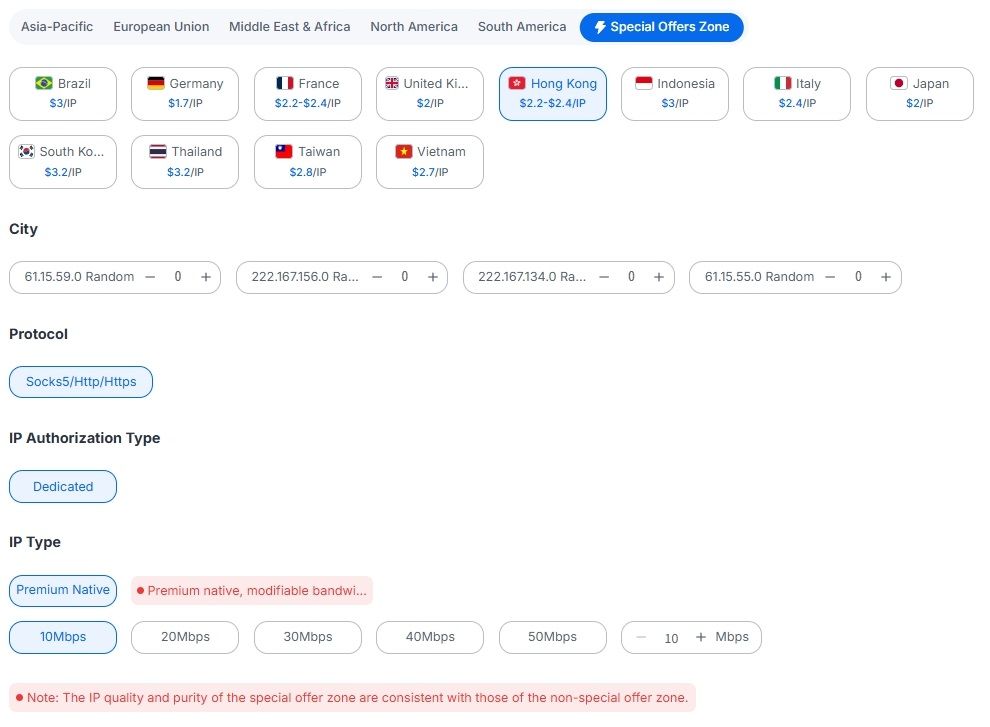
If you need a fixed Hong Kong exit IP for long-term use rather than rotating IPs billed by traffic, consider IPDEEP's Hong Kong static residential / ISP proxy plans:
Hong Kong nodes are available for around $2.20–$2.40 per IP/month, with dedicated access, ISP classification, and a fixed address throughout the rental period.
The service supports HTTP, HTTPS, and SOCKS5, offers customizable bandwidth up to 50 Mbps, and provides larger discounts for longer rental terms. Special offers may also be available.
Check the current purchase page for regional availability, inventory, bandwidth options, and discounts.
4 Things to Check Before Buying a Hong Kong Static Residential IP
1. Verify the IP Type
Use a tool to check the ASN, ISP name, and network type. Make sure the IP is not classified as hosting, then verify that its geolocation matches your target market.
Results from a single database should be treated as indicative. Cross-check with multiple sources whenever possible.
2. Confirm Whether the IP Is Dedicated
Static means the address stays the same; dedicated means the IP is reserved for your use. These are two different things. Before buying, confirm whether the product is dedicated or shared.
3. Check Bandwidth, Protocols, and Replacement Policies
Bandwidth allocation, concurrency limits, supported protocols, and IP replacement policies can all affect long-term performance.
4. Start Small Before Scaling Up
Hong Kong IP inventory can change over time. Start with one or two IPs, test them in your actual workflow, and scale up only after confirming that they meet your requirements.
Frequently Asked Questions
Q1: What should I test before buying a Hong Kong static residential IP?
At a minimum, check three things:
First, check the ASN and ISP information to confirm that the IP is classified as ISP or Residential rather than Hosting.
Second, check the geolocation to make sure the detected region matches your target market. Third, test the actual connection by logging in to or accessing your target platform and checking whether additional verification prompts appear.
If possible, repeat the tests after some time to see whether the results remain consistent.
Q2: How do I integrate a Hong Kong static residential IP into my existing workflow?
Once you receive the IP details, retrieve the proxy credentials or add your device's public IP address to the provider's allowlist. Then enter the details into your anti-detect browser, proxy client, or business application.
After setup, run an IP check to confirm that the exit address, ASN, and network classification match your requirements.