What Is Whoer.net? Proxy IP Testing and Online Privacy Guide



Clean IP picks: Static IPs from $1.5 each, Dynamic IPs from $0.5/GB


Checking Whoer.net after setting up a proxy is a common first step. But with dozens of fields and a single percentage score, it is not always clear which warnings need attention and which simply reflect normal differences.
This guide explains the main detection items and walks you through how to troubleshoot potential issues in the right order.

What Is Whoer.net?
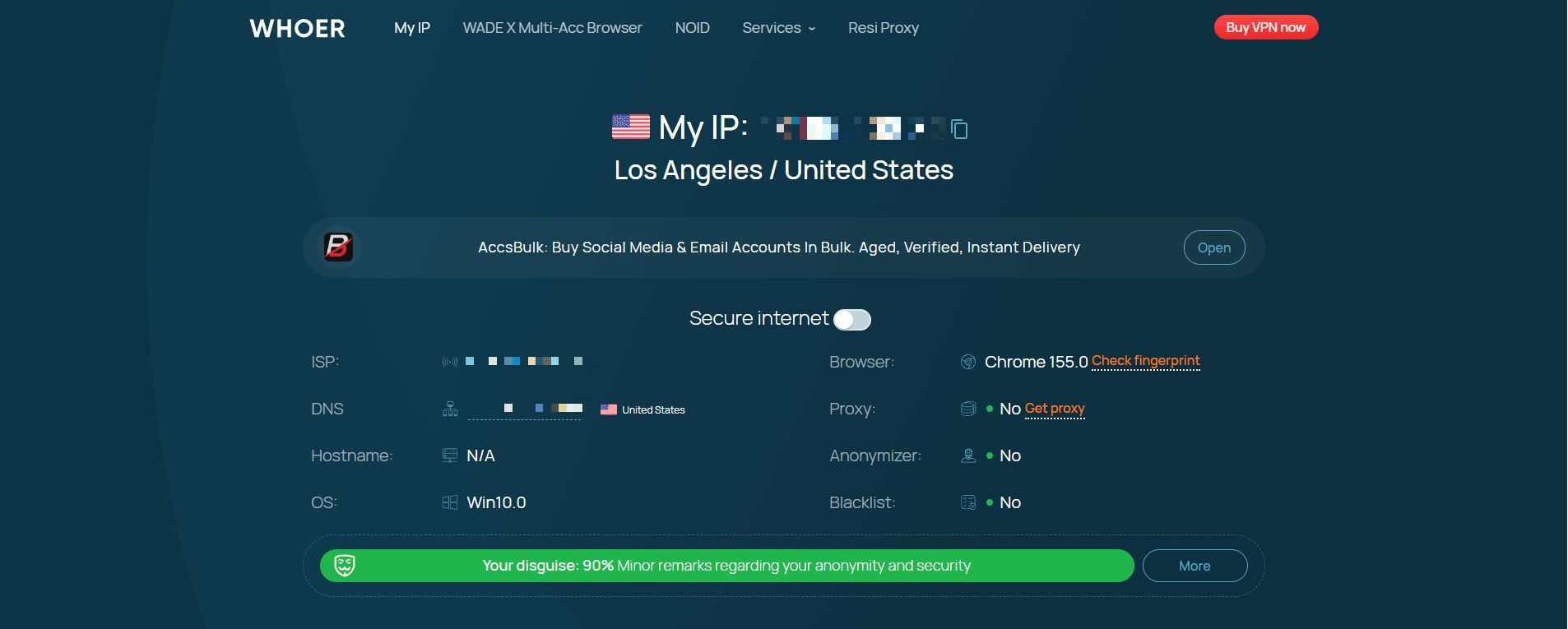
Whoer.net is a free online network testing tool that you can use without creating an account.
It checks information exposed by your browser and network connection, including your public IP address, ISP and ASN, IP blacklist status, proxy or data center IP detection, DNS resolution, WebRTC, system time zone, browser language, and HTTP headers. It then provides an anonymity score.
Whoer.net checks your setup; it does not hide your information or change your settings. Think of it as a snapshot of how your device appears online at that moment.
It is commonly used for three purposes: checking whether a proxy is working, investigating potential DNS or WebRTC leaks, and verifying whether your time zone and language settings match your intended setup.
For cross-border e-commerce, social media account management, and data collection, Whoer.net can serve as an initial check after configuring a proxy or network environment.
What Does Whoer.net Check?
▸ Public IP Address and Geolocation: Displays your public IP address, country, city, ISP, and ASN. These details help you check whether your traffic is using the intended proxy connection.
▸ Proxy and Data Center IP Detection: Proxy detection, web proxy detection, data center IP identification, and open proxy port checks appear as separate indicators. Each uses different detection criteria, and a positive result does not necessarily mean your proxy is not working.
▸ IP Blacklists: Checks whether an IP address appears on public abuse or spam-related lists. Being listed on one database does not automatically make an IP unsuitable for every use case.
▸ DNS Checks: Shows detected DNS server information to help you assess whether domain resolution is consistent with your network configuration.
▸ WebRTC: Checks whether your browser's WebRTC connections may expose additional IP address information.
▸ System Time Zone and Browser Language: Compares these settings with your IP's apparent location as a reference for assessing environmental consistency.
▸ HTTP Headers and Browser Information: Displays information such as your User-Agent, screen details, and browser version, which websites may use to understand your browser environment.
▸ Anonymity Score: Combines selected indicators into a percentage. Since the scoring algorithm is not public, the result is more useful for identifying potential issues than for comparing setups directly.
Browser fingerprinting can also involve techniques such as Canvas, WebGL, and AudioContext, which use rendering or audio-related characteristics to help distinguish devices. Whether a particular tool tests these features depends on the checks it actually provides.
One important distinction: a residential IP is not automatically a trusted IP.
Network type is only one factor platforms may consider. Actual results can also depend on an IP's usage history, whether it is shared, and the intended use case.
Why Is Your Anonymity Score Low? Common Causes and Fixes
A score below 100% is common. The following table covers frequent discrepancies and how to assess them. The goal is to identify genuine issues, not to make every setting match the IP's location.
Follow a consistent troubleshooting order: First, confirm that your public IP is the intended proxy exit. Next, check DNS and WebRTC for unexpected address exposure. Finally, review your time zone and language settings.
The first steps focus on network routing and configuration; the last is about whether your browser environment reflects your actual needs.
DNS deserves special attention: a DNS server and an exit IP being located in different regions does not automatically indicate a leak. The difference may result from normal routing or inaccurate geolocation data. What matters is whether DNS requests follow the intended route.
If results differ between tools, cross-check the details. An exposed city, ISP, hostname, and public IP address mean different things. You can use another IP checking tool to test the same IP address again.
SOCKS5 users should also check DNS handling. SOCKS5 does not necessarily route DNS requests through the proxy, so web traffic may use the proxy while DNS requests still go through the local ISP. Check whether your client supports remote DNS resolution and whether the relevant option is enabled.
Limitations of Whoer.net Results
▸ A Snapshot, Not a Behavioral Audit: Whoer.net checks your setup at a particular moment. It does not track visit frequency, interaction patterns, session history, or payment behavior, all of which may matter to online platforms.
▸ Not the Same as a Platform's Risk Assessment: Google, Amazon, Meta, and other platforms use their own models and historical data. The same browser and network setup can produce different outcomes on different sites. Mobile apps may also access information that a browser cannot.
▸ A High Score Does Not Guarantee Fewer Verification Checks: Consistent parameters only mean the tested signals do not obviously conflict. Whether an IP is widely shared or has appeared on abuse lists is a separate issue.
The reverse is also true: a score below 100% does not automatically make an IP unusable. Treat any single tool's result as one source of information.
How to Choose a Proxy IP and Configure Your Network
1. Choose a Residential Proxy for Your Use Case
Choose a proxy based on your use case, target location, and session requirements. IP type, exit stability, and real-world performance matter just as much as an anonymity score.
For cross-border e-commerce and social media operations that require a consistent network exit, consider IPDEEP Static Residential IPs. The IP address remains fixed during the subscription period, making this option suitable for workflows that benefit from a consistent connection.
For checking public pages in different regions, conducting market research, or performing compliant data collection, consider Dynamic Residential Proxies. They cover more than 200 countries and regions, allowing you to choose locations and rotation settings based on your task.
IPDEEP also offers unlimited residential proxies, mobile proxies, special offers, and VPS products. Available locations and bandwidth options vary by product, so check the relevant product page before purchasing.
A proxy changes your network exit, but it cannot guarantee that a platform will not request additional verification. Consider platform rules, account usage, and actual test results when choosing a proxy.
2. Use Browser Environment Management Tools When Needed
If you manage multiple separate environments, you can pair proxy IPs with browser environment management tools to isolate cookies, browser settings, and some fingerprint parameters. However, these tools cannot guarantee that all account association risks will be eliminated.
After setup, use Whoer.net to check whether your public IP, DNS, WebRTC, time zone, and language settings match your expectations.
Frequently Asked Questions (FAQ)
Q1: What Does a 100% Anonymity Score Mean?
It means the parameters checked by the tool appear consistent with one another. This is a browser and network self-check, not a guarantee of complete anonymity.
Other websites may also consider IP history, request patterns, account activity, and device information. A 100% score does not mean a website cannot identify proxy use.
Q2: Why Does Whoer.net Show "Proxy: Yes" When My Proxy Is Enabled?
This does not necessarily mean your proxy is failing.
Whoer.net may identify a proxy based on IP databases, network characteristics, HTTP headers, or other detection signals.
First, confirm that the public IP shown is your intended proxy exit. Then review any DNS, WebRTC, and proxy-related warnings.
Q3: Should I Choose Static or Dynamic Residential Proxies?
Static residential IPs are a better fit for workflows that need to maintain the same network exit over time, such as store operations and ongoing social media account management.
Dynamic residential proxies are more suitable for tasks that require changing locations or accessing large numbers of pages across different regions.
The two options serve different purposes and can be used together by the same team.