X (Twitter) Multiple Accounts: Residential Proxy Guide



Clean IP picks: Static IPs from $1.5 each, Dynamic IPs from $0.5/GB


Cross-border e-commerce businesses, international social media marketing teams, and global brands often need to manage multiple X (formerly Twitter) accounts to run brand profiles in different markets or manage accounts on behalf of clients.
As the number of accounts grows, registration and login management can become more complicated.
Repeatedly using the same IP address across multiple accounts or frequently changing the IP's geographic location may trigger additional verification.
When registering multiple X accounts, it's important to follow platform rules and choose and configure proxy IPs carefully.

Why Does IP Matter When Registering Multiple X Accounts?
Managing multiple accounts is not inherently a problem. What matters is how the accounts are organized and the network environments used to access them.
A proxy IP provides a network connection; it does not replace compliance with platform rules.
Using a proxy does not exempt accounts from platform policies or make repetitive content and coordinated inauthentic behavior acceptable.
From a network perspective, there are several factors worth planning for:
▸ IP location: Choose an IP location that makes sense for your target market and avoid unnecessary location changes. Switching between regions multiple times a day can create noticeable changes in the connection environment.
▸ Connection stability: Registration, verification, and subsequent logins may require a continuous session. A change in the outgoing IP during the process can interrupt the connection.
▸ Shared IPs and verification: When multiple accounts repeatedly use the same IP or are accessed in rapid succession, their network activity may appear more closely connected.
Additional verification is not necessarily caused by the IP alone; account status, device environment, and usage patterns may also play a role.
When Should You Use Dynamic Residential IPs?
Both dynamic and static residential IPs can be used for account registration and management, but they serve different purposes.
Price is only one consideration. You should also consider whether accounts need long-term access, whether the outgoing IP must remain fixed, and how much geographic coverage and traffic your workflow requires.
▸ Dynamic residential IPs: Suitable for tasks that require flexible IP rotation.
These proxies use IP addresses associated with residential networks. Depending on the provider and plan, IPs can rotate according to configured rules, per request, or at set intervals. They are useful for accessing multiple regions and handling short-term network tasks.
During registration, you can select an IP location based on your target market and configure the available session settings to maintain a consistent connection throughout the registration and verification process.
▸ Static residential IPs: Suitable for accounts that need a consistent outgoing IP.
A static residential IP remains the same over an extended period, making it a practical option for accounts that require regular logins, brand profile management, content publishing, and client account support.
A fixed IP reduces the need to change network endpoints frequently and makes it easier for teams to manage account access consistently.
Which Option Should You Choose?
If your workflow includes both account creation and long-term management, evaluate the requirements of each stage separately rather than using the same proxy type for every task.
If you need a fixed IP from the beginning and your account volume and budget allow for it, starting with a static residential IP is also a reasonable option.
How to Configure a Dynamic Residential Proxy for X Account Registration
1. Choose a Plan
Estimate your expected account activity and traffic needs, then choose a plan that fits your requirements.
Starting with a small trial is often a better way to assess suitability than purchasing a large plan upfront.
2. Get Your Proxy Address and Authentication Details
Retrieve the proxy host, port, and authentication details from your dashboard. Depending on the provider, you may connect using a generated proxy endpoint or username-and-password authentication. Follow the instructions for your specific plan.
3. Select a Location and Configure Session Settings
Choose the target country and city, then configure IP rotation according to your task. For registration and login workflows, use a sticky session if your plan supports it. For public web browsing, per-request rotation may be suitable when supported.
4. Configure the Proxy in Your Browser or Tool
Enter your proxy details in your browser, browser profile manager, or data collection tool. Common supported protocols include HTTP, HTTPS, and SOCKS5.
5. Check Your Configuration and Organize Account Environments
▸ Keep account environments organized: Use separate browser profiles or isolated environments for different accounts to reduce unnecessary account switching within the same profile.
This can make team collaboration and access management easier, but it does not prevent the platform from identifying relationships between accounts. X also offers account switching, X Pro, and Delegate features to support account management and collaboration.
▸ Keep environment settings consistent where appropriate: Use system time zone and browser language settings that reasonably match your normal operating environment and intended location.
▸ Prepare the required verification details: Have an email address or phone number ready as required by X, and complete any requested verification. Do not use a proxy to bypass technical restrictions on account creation.
Should You Switch to a Static Residential IP After Registration?
The decision depends on how you plan to use the account, not simply on whether registration was successful.
▸ Short-term testing or temporary access: For tasks that do not require ongoing logins, you can continue using a dynamic residential proxy based on your actual needs.
▸ Long-term brand account management: For accounts that need regular logins, content publishing, and message management, a static residential IP can reduce changes to the network environment.
▸ Plan for changes when switching: Moving from a dynamic residential IP to a static one may change your IP location and network environment.
Plan your target location in advance and complete any verification requested by the platform. Do not assume that switching IPs will prevent security checks.
How to Choose a Dynamic Residential Proxy
IPDEEP offers three types of proxy solutions: traffic-based dynamic residential proxies, bandwidth-based dynamic residential proxies, and static residential IPs. They cover multiple countries and regions and support common protocols, including HTTP, HTTPS, and SOCKS5.
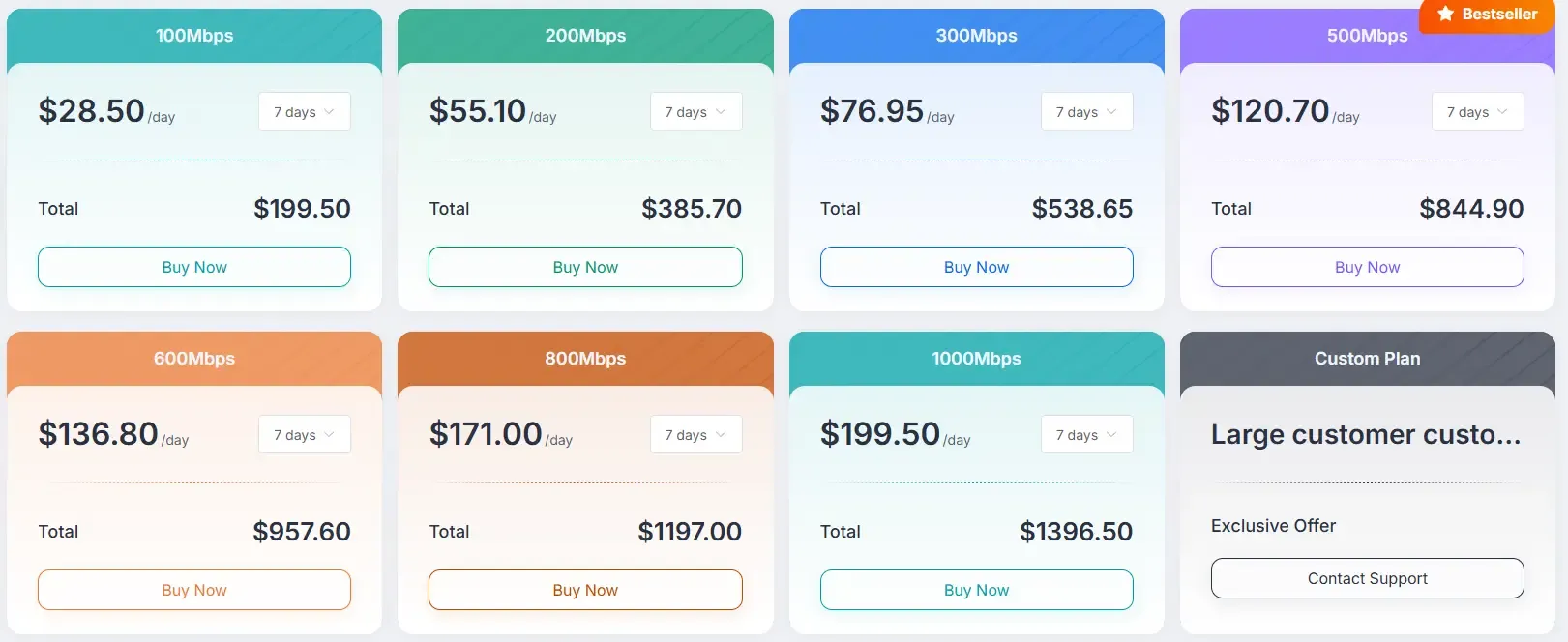
Traffic-based plans start at 5 GB, with a 30-day validity period and a price of $6.50. Bandwidth-based plans start at 100 Mbps and are billed by the day. Static residential IPs provide fixed outgoing IP addresses with different bandwidth options.
If you need both rotating IPs and stable access for long-term account management, you can use dynamic residential proxies for regional access and short-term tasks, while reserving static residential IPs for accounts that require ongoing management.
Before purchasing, check the official website for available locations, plan validity, and bandwidth options: Traffic-Based Dynamic Residential Proxies, Bandwidth-Based Dynamic Residential Proxies, and Static Residential IPs.
Frequently Asked Questions
Q1: Can a Dynamic Residential IP Guarantee Successful X Registration?
No. A proxy only changes the network exit point. Registration success also depends on account information, verification methods, device environment, and account status.
Q2: Should You Change Your Outgoing IP During Registration?
It is generally best to avoid unnecessary IP changes during registration and verification. If your plan supports sticky sessions, you can keep the same exit IP throughout the process. Changing IPs midway may interrupt the session or lead to additional verification.
Q3: Should You Choose Dynamic or Static Residential IPs?
It depends on whether you need to keep the same outgoing IP over time.
Dynamic residential proxies offer more flexibility for accessing multiple regions and handling short-term tasks, while static residential IPs are better suited to long-term logins and ongoing account management. You can also combine both options.